
Prefer a video tutorial?
Starting a Truck Replenishment
1) In your Menu select "Replenishment" from the truck inventory you wish to restock. (Not seeing Replenishment? See: Truck Replenishment Feature.
2) Select  to add a new replenishment.
3)Begin adding Products:
Scan⬇️ Packaging GS1 DataMatrix OR Enter⬇️ NDC/Lot/Exp on vial.
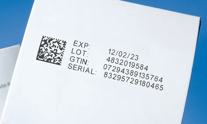 OR
OR 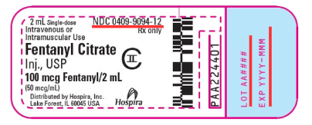
4)Applying control values? Select  & scan or enter label(s)
5) Receiving a new product? Select  and then
Enter NDC/Lot/Exp as they appear on vial.
Truck Replenishment Video Tutorial